The refresh token grant
All domains, credentials, and tokens in these examples are fictional.
The printer now offers a yearly calendar. You connect your photo account once, and every December the printer picks twelve recent photos and sends you a proof. You will not be at your browser in December when the printer needs those photos.
An access token cannot cover that gap. In the earlier exchange it lasted ten minutes, and short lifetimes are deliberate: if a token leaks, it is only useful briefly. The printer needs a way to obtain new access tokens later without sending you through the authorization flow again.
Access that outlasts a visit
A refresh token is a credential that a client uses to obtain new access tokens for an authorization it already has. It goes to the authorization server's token endpoint, never to the photo API.
This time, when the printer exchanged its authorization code, the photo service decided to issue a refresh token alongside the access token:
{
  "access_token": "demo-access-token-8",
  "token_type": "Bearer",
  "expires_in": 600,
  "refresh_token": "demo-refresh-token-3",
  "scope": "photos.read"
}
Whether a refresh token is issued is the authorization server's decision. Some services issue one only when the client asks for continued access. In OpenID Connect, for example, the client requests the offline_access scope, and the consent screen can mention it. Other services decide by client type or policy.
The printer's backend stores the refresh token with your connection record, protected like any other long-lived secret. The access token is used and discarded. The refresh token is the part that carries your approval forward.
Refreshing an access token
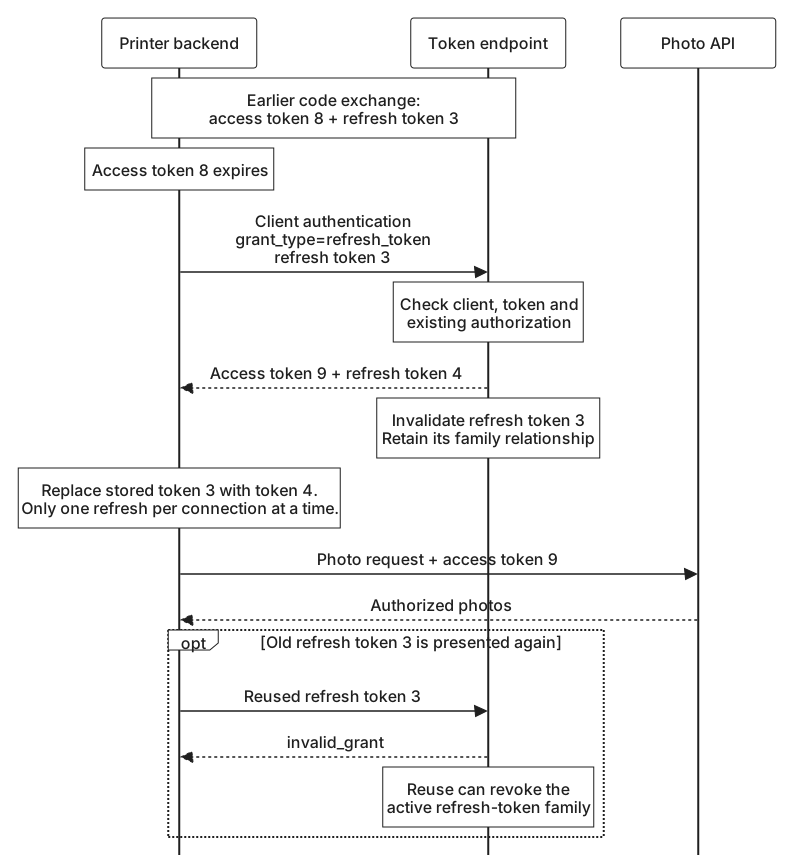
In December, the printer's backend sends the refresh token to the token endpoint. The printer is a confidential client, so it authenticates as it did during the code exchange:
POST /token HTTP/1.1
Host: auth.photos.example
Authorization: Basic cGhvdG8tcHJpbnRlcjpkZW1vLW9ubHktbm90LWEtcmVhbC1zZWNyZXQ=
Content-Type: application/x-www-form-urlencoded

grant_type=refresh_token
&refresh_token=demo-refresh-token-3
The authorization server checks that the client is authenticated, that the refresh token was issued to this client, and that it is still valid. It also checks that the underlying authorization still exists. If you had disconnected the printer from your photo account, the token would no longer be honored.
The request can include a scope parameter to ask for less than the original grant, for example a token for only one purpose. It cannot ask for more. A refresh token carries forward what you approved. Broader access needs a new authorization.
A successful response returns a new access token, which the printer uses at the photo API exactly as before.
When the refresh token is replaced
The response may also contain a different refresh token:
HTTP/1.1 200 OK
Content-Type: application/json
Cache-Control: no-store
Pragma: no-cache

{
  "access_token": "demo-access-token-9",
  "token_type": "Bearer",
  "expires_in": 600,
  "refresh_token": "demo-refresh-token-4",
  "scope": "photos.read"
}
This is refresh token rotation. Each refresh token works once, and each successful refresh hands the client its replacement. The printer must save demo-refresh-token-4 in place of the old one before it depends on the result. If it keeps using demo-refresh-token-3, its next refresh will fail.
Rotation helps a server notice theft. Only one party should ever hold the newest refresh token. If an older one is presented again, either the client made a mistake or someone else has a copy. Many servers respond by revoking the whole chain of tokens for that authorization, which stops the thief and the legitimate client alike until you reconnect.
That makes careful handling important on the client side. If two of the printer's workers refresh the same connection at the same moment, one of them will present a token the other has already used. A client using rotation should make sure only one refresh for a connection runs at a time, and should treat a lost refresh response with the same caution as a lost code exchange: it cannot assume the old token still works. When no replacement is returned, the client keeps using the refresh token it already has.
When refresh stops working
Refresh tokens do not last forever. They can expire, go unused for too long, or be revoked because you disconnected the printer, changed a security setting, or the service detected reuse. The token endpoint then answers with invalid_grant.
The printer cannot repair that on its own. Retrying the same refresh token will not help, and it has no other way to obtain access you have not approved again. The right response is to mark the connection as needing attention and ask you to reconnect the next time you visit, or send you a notice that December's calendar is waiting for your photos.
For public clients, such as an application running entirely in the browser, the server cannot rely on client authentication to tie a refresh token to the right application. Current guidance asks servers to protect those refresh tokens in another way, such as rotation or binding the token to a key the client holds. Tokens and resource servers will cover rotation, reuse detection, and revocation in more detail, and Security and failure cases will look at how stolen refresh tokens are used and contained.