Device authorization
All domains, codes, and tokens in these examples are fictional.
You have bought a digital photo frame for your living room. It has a screen and a single button, and you would like it to show photos from your photo account.
The authorization code flow does not fit well here. The frame has no convenient browser, and even if it had one, typing an email address and password with a single button would be miserable. Asking you to type your password into the frame would bring back the problem OAuth was meant to solve.
The device authorization grant splits the work between two devices. The frame asks for access, and you approve it on a device that is easier to use, such as your phone.
Starting on the device
The frame is a public client. Every frame of this model runs the same software, so a secret built into it could be extracted from any one of them. It identifies itself with a client ID and sends a request to the photo service's device authorization endpoint:
POST /device_authorization HTTP/1.1
Host: auth.photos.example
Content-Type: application/x-www-form-urlencoded

client_id=living-room-frame
&scope=photos.read
The response gives the frame two codes for two different audiences:
HTTP/1.1 200 OK
Content-Type: application/json
Cache-Control: no-store

{
  "device_code": "demo-device-code-4",
  "user_code": "WDJB-MJHT",
  "verification_uri": "https://photos.example/device",
  "verification_uri_complete": "https://photos.example/device?user_code=WDJB-MJHT",
  "expires_in": 900,
  "interval": 5
}
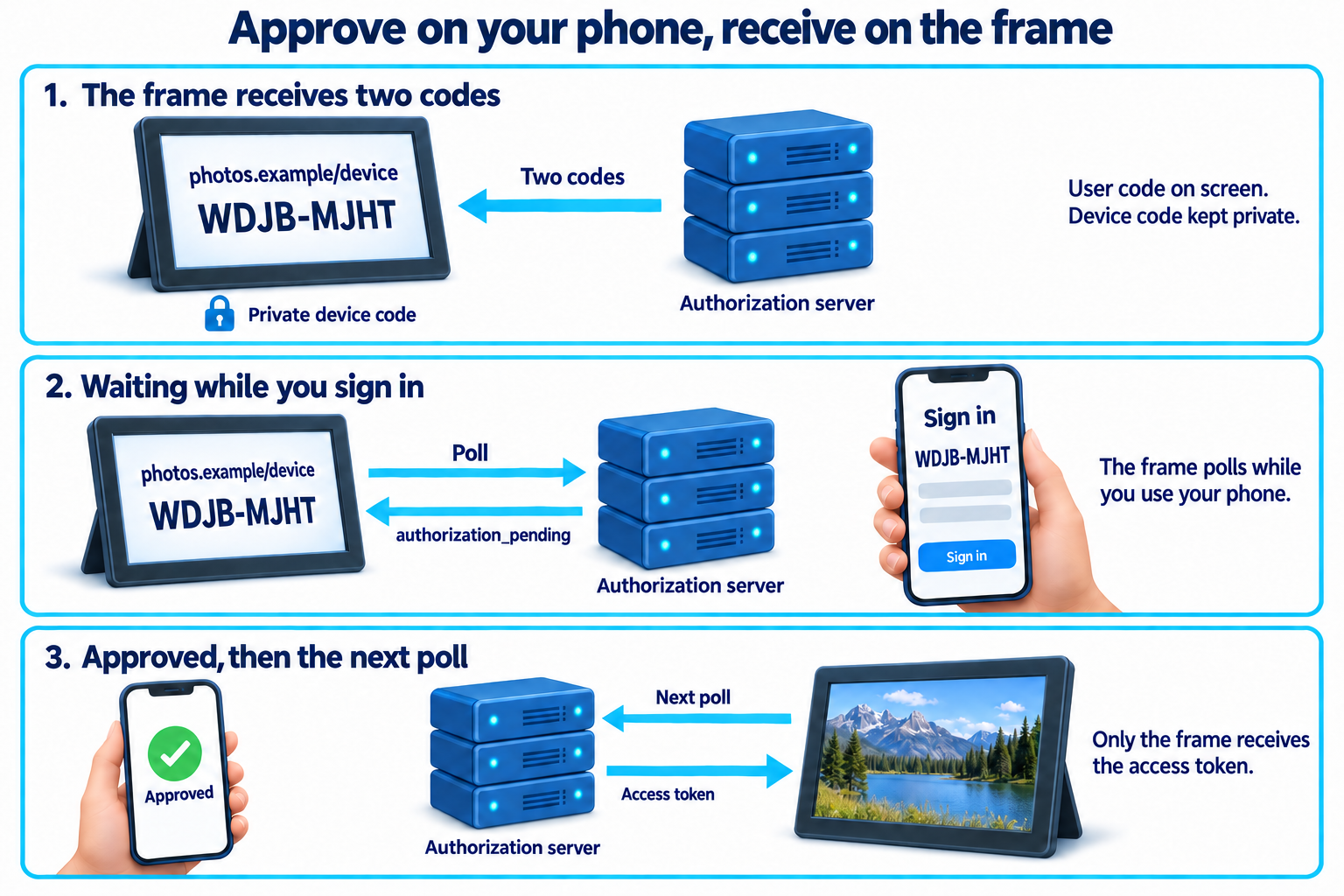
The user_code is meant for you. It is short and easy to read and type. The device_code stays with the frame, which will use it to collect the result. The frame never shows it on screen.
The frame displays the verification address and the user code. It might also show a QR code built from verification_uri_complete, so you can scan it with your phone instead of typing. Both codes stop working after fifteen minutes in this example.
Approving on another device
On your phone, you open photos.example/device. The photo service asks you to sign in if you are not already signed in, then asks for the code shown on the frame. You type WDJB-MJHT.
The service now knows which pending request you mean. It shows you what is asking and what it wants: Living room frame would like to view your photos. You approve.
Notice where each part happened. You signed in and made your decision on the photo service, in your phone's browser. The frame never saw your password, and your phone never needed to know anything about the frame except the code you read from its screen.
Polling for the result
While you were busy with your phone, the frame could not wait for a redirect. Nothing sends the frame a message when you approve. Instead, it asks the token endpoint at intervals:
POST /token HTTP/1.1
Host: auth.photos.example
Content-Type: application/x-www-form-urlencoded

grant_type=urn%3Aietf%3Aparams%3Aoauth%3Agrant-type%3Adevice_code
&device_code=demo-device-code-4
&client_id=living-room-frame
The grant type is a full URN rather than a short word. That is how extension grants are named, and the device authorization grant was added to OAuth after the original specification.
Until you finish, the token endpoint answers with an error that means "not yet":
HTTP/1.1 400 Bad Request
Content-Type: application/json
Cache-Control: no-store

{
  "error": "authorization_pending"
}
The frame waits at least the number of seconds given by interval before asking again. If it asks too quickly, the server replies with slow_down, and the frame adds five seconds to its interval for the rest of the attempt. Once you approve, the next poll returns an access token in the same shape as any other token response.
Two other answers end the attempt. access_denied means the request was refused, and expired_token means the codes ran out before anyone finished. In either case the frame stops polling and offers to start again with new codes.
A code someone else started
The user code connects your approval to one pending request. That is also what makes it attractive to an attacker.
Suppose someone starts a device authorization request from their own device, then sends you a message: "Your photo account needs verifying. Go to photos.example/device and enter WDJB-MJHT." The page is genuine, and the sign-in is genuine. If you enter the code and approve, the attacker's device receives access to your photos.
Nothing in the protocol can tell whether the person approving is standing in front of the device that asked. The defenses come from the approval screen and from people's habits. The service names the client that is asking and what it wants, so you have a chance to notice that you are not setting up a photo frame. The codes expire quickly, which limits how long an invitation like that stays useful. And a code only makes sense when you are looking at it on your own device's screen. A code that arrives in an email or a message from someone else should be treated with suspicion.
The short user code creates one more risk. Someone could try guessing codes on the verification page, hoping to land on a pending request. The service limits how many attempts it accepts and makes codes long enough, compared with the number of requests pending at once, that guessing is impractical.
Use this grant for devices that cannot reasonably show a browser or accept typed input, such as televisions, frames, and some command-line tools. An application that can open a browser on the same device should use the authorization code flow, where the approval and the result stay together in one place.