Digital signatures
A result worth checking
When the lab finishes Alex's blood test, it sends the result to the clinic. The message may pass through a queue, sit in storage overnight, and be forwarded by an integration service before the portal displays it. Each connection along the way may use HTTPS, but that only protects data while it moves between two endpoints. Once the result is stored or forwarded, the connection that carried it is gone.
The clinic wants assurance that travels with the result itself: that it came from the lab, and that nobody changed a value on the way. A digital signature provides that. The lab signs the result with its private key, and anyone holding the lab's public key can check it, no matter how many systems the message passed through.
Signing and verifying
Signing starts with a hash. A hash function turns any amount of data into a short, fixed-size value. Changing even a single character of the input produces a completely different hash, and it is not practical to find two different inputs with the same hash. The hash acts as a compact fingerprint of the exact bytes being signed.
The lab calculates the hash of the result and uses its private key to produce a signature over it. It sends the result and the signature together. The clinic calculates the hash of what it received, then uses the lab's public key to check that the signature matches that hash.
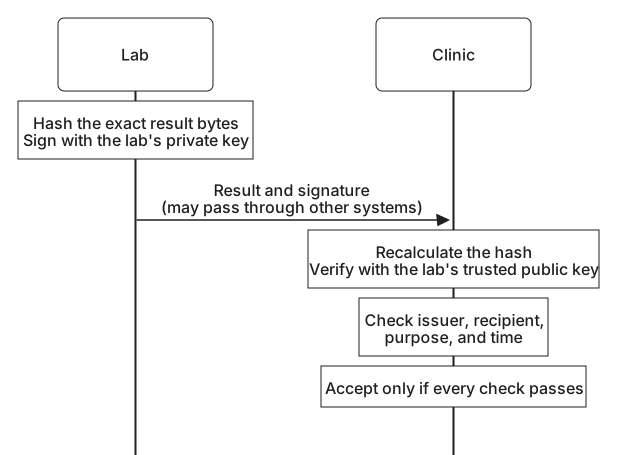
If an attacker changes the result, the clinic's hash no longer matches the one that was signed and verification fails. The attacker cannot produce a new matching signature without the lab's private key.
A signature covers exact bytes, not meaning. If a proxy reformats the JSON of a signed result, changing only spacing or the order of fields, the hash changes and the signature fails even though the content means the same thing. Signed formats deal with this by signing a fixed encoding. A JSON Web Signature (JWS), for example, signs the encoded header and payload exactly as they appear in the message, and the verifier checks those same characters.
What a signature shows
A signature that verifies shows two things: the content has not changed since it was signed, and it was signed with the private key matching the public key the clinic used. Everything else needs another source of confidence.
It does not show who holds that private key. If the clinic was given the wrong public key, a valid signature proves only that the wrong party signed. It does not show that the content is true; a lab can sign a mistaken result. It does not keep the content secret either. As Protecting credentials and messages explains, signed data such as a JSON Web Token can usually be decoded and read by anyone who has it.
A signature also does not say that a message is recent or intended for its reader. An attacker who recorded a signed message can present it again later, or to a different recipient, and the signature will still verify.
Deciding what to accept
To close those gaps, the lab includes the facts the clinic needs inside the signed content. Here is a fictional signed result, shown decoded so the fields are readable:
Header
{
  "alg": "ES256",
  "kid": "lab-2026-09",
  "typ": "lab-result+jwt"
}

Payload
{
  "iss": "https://results.lab.example",
  "aud": "https://portal.harborclinic.example",
  "sub": "patient-48213",
  "iat": 1790640000,
  "exp": 1790726400,
  "jti": "result-7f3c21",
  "test": "Complete blood count"
}
The issuer (iss) names the lab, and the audience (aud) names the clinic as the intended recipient. The issued-at and expiry times bound when the message is acceptable, and the unique identifier (jti) lets the clinic notice a result it has already processed. The type (typ) keeps a lab result from being mistaken for another kind of signed message from the same key. Because these fields are covered by the signature, nobody can change them without verification failing.
The header also carries an algorithm name and a key identifier. The clinic should treat both as hints, never as instructions. The clinic decides for itself which issuers, keys, and algorithms it accepts for lab results. If it simply used whatever algorithm or key a message named, an attacker could name an algorithm the clinic never intended to allow, or supply a key of their own. Storing and using keys shows how key identifiers help a verifier choose among its own trusted keys.
key = trusted_lab_keys.find(header.kid)      # from the clinic's own configuration
if key is None or header.alg not in key.allowed_algorithms:
    reject()
if not verify(key, signed_bytes, signature):
    reject()
if payload.iss != LAB_ISSUER or payload.aud != CLINIC_AUDIENCE:
    reject()
if now() > payload.exp or already_processed(payload.jti):
    reject()
accept(payload)
Where signatures appear
Once you know the pattern, signatures appear throughout identity systems. The passport chip from Proofing methods carries data signed by the issuing authority. A passkey signs a challenge during sign-in. Identity providers sign the assertions and ID tokens that tell an application who signed in, and certificates are themselves signed statements.
Each of these follows the same shape: find the right trusted key, verify the signature over the exact bytes, and then check that the signed content fits this use. The OpenID Connect lessons on validation and trust apply these steps to ID tokens in detail, including issuer, audience, expiry, and nonce checks.