Architecture
Beyond the Login combines a static learning website with backend services for BTL accounts and independently managed tenants.
The website
A build script turns HTML pages and TypeScript page definitions into static HTML. Cloudflare Pages serves the result, along with local fonts, images, and compiled JavaScript. The shared design system supplies navigation, forms, tables, dialogs, and light and dark themes.
Learn and Docs are public reading areas. Tenant controls load data from authenticated APIs. Protecting a page is only one layer: the backend checks the current permission for each operation, even when someone calls the API directly.
Services and storage


- Pages and its server handlers
- Serve the site, gate protected pages, and forward account and management API requests to the identity service.
- Identity Worker
- Handles BTL accounts and sessions, then authorizes tenant management actions. BTL account records and authentication history live in identity storage.
- Platform Worker
- Maintains the tenant registry, memberships, and lifecycle. A new tenant is ready as soon as it is reserved. Private service interfaces resolve a tenant, its hostname, and its current generation.
- Tenant authorization Worker
- Resolves a tenant from its verified hostname and passes the request to that tenant's store, which serves the public protocol endpoints. Discovery reads that tenant's scopes, keys, and endpoint settings. Access tokens are issued for permitted client credentials requests. Authorization code requests use tenant-local sign-in and each client's consent setting before a one-time code is returned.
- Tenant stores
- Each tenant has its own store, a Cloudflare Durable Object with its own SQLite database, holding that tenant's directory, management permissions, OAuth clients and scopes, keys, and history. A store is created the first time the tenant is used. It refuses requests meant for any other tenant, checks permissions, and records each change with its audit event in one transaction.
Tenant users and BTL administrators are different identities. Creating a tenant user does not create a BTL account. A matching email address does not grant BTL access or access to another tenant.
A tenant management request
Consider saving a scope. The selected tenant identifies the requested workspace; it is not proof of permission. The backend resolves the signed-in BTL principal's current membership and checks the required permission in the resolved tenant.
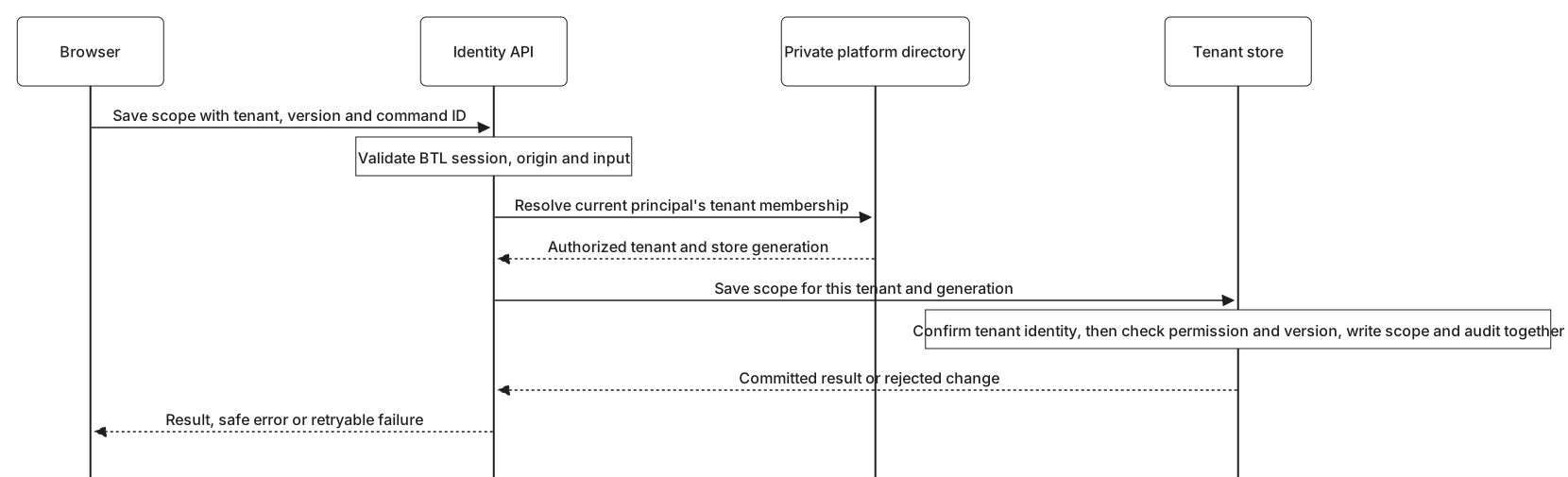
Updates carry a version so a stale editor cannot silently overwrite a newer change. A command identifier makes a retry safe when the first response is lost. These controls are enforced by the service, not by trusting browser state.
Audit and Logs
Audit explains who requested a change, which resource it affected, and the outcome. Logs explains service execution and failures. They have separate read permissions. Tenant views expose only the allowed projection for that tenant.
Workers emit structured events with a readable message and request correlation. A Tail Worker collects allowlisted tenant runtime events into platform storage. Tenant management history and BTL account security history remain separate; being a tenant administrator does not grant access to BTL authentication logs or raw operator logs.
History retention and bounded cleanup apply to the relevant stores. Deleting a client or scope does not delete its retained audit history.
Changes and deployment
Static pages, backend Workers, and database schema changes are separate deployment steps. A successful Pages build alone does not update backend behavior. Tenant stores apply their own schema changes the next time each tenant is used after a new version is deployed. Changes that span these layers need compatible service versions and schema migrations before their user-facing behavior is verified.
Development and production use separate resources. A development rollout does not release the same changes to production.